| Print Censor - Frequently Asked Questions
Answers on customers questions |
- How to enable viewing print jobs for some printers?
HP DesignJet 5500, DesignJet 110 and other HP plotters
HP network printers
HP LaserJet 1000, 1005, 1010, 1020, HP Color LaserJet 1600, 2600
Print jobs from Corel Draw
- How to move the Print Censor database from one computer to another?
- Why users don't receive messages from Print Censor?
- Why doesn't the computer name restriction work for some users?
- After Print Censor has been installed, the events of pausing and resuming print jobs often occur in System Events.
Why does it happen and how to disable them?
- Why don't web pages for all (some) printers open?
1. How to enable viewing print jobs for some printers?
HP DesignJet 5500, DesignJet 110 and other HP plotters
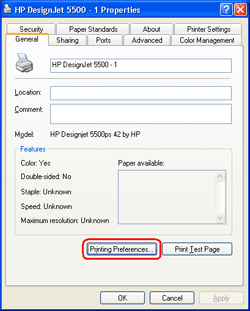
- If you have HP plotter, open its properties and click the "Printing Preferences…" button on "General" tab:
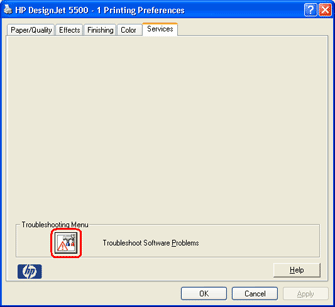
- On "Printing Preferences" window switch to "Services" tab and click the "Troubleshoot Software Problems" button:
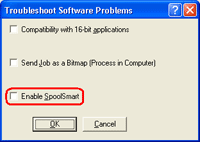
- Disable "Enable SpoolSmart" option, click the OK button and click the OK button on "Printing Preferences" windows (previous step).
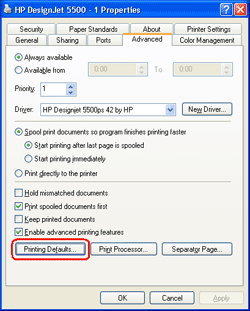
- Switch to "Advanced" tab on printer properties window, click the "Printing Defaults…" button and execute again steps 2 and 3.
- Now you can use this printer for printing and view the contents of its print jobs.
HP network printers
- If you have HP inkjet or laser network printers, go to http://hp.com, click the link "Software & Driver Downloads"
and find your printer model. "HP Universal Print Driver for Windows" can be downloaded almost for all printers.
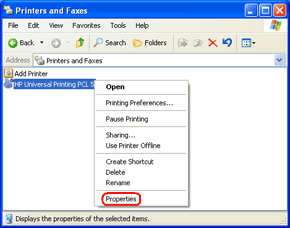
- For example, let us see how to configure the printer "HP LaserJet 8100". After you install printer driver,
you will have a printer named "HP Universal Printing PCL 5". Open its properties:
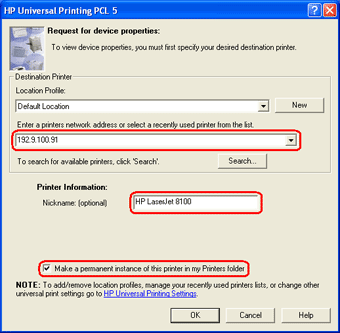
- Use the "HP Universal Printing PCL 5" dialog box to enter the IP address of your printer (192.9.100.91),
Printer name (HP LaserJet 8100) and enable the "Make a permanent instance of this printer in my Printers folder"
option. Click the OK button after that.
- Now you can use this printer (HP LaserJet 8100) for printing and view the contents of its print jobs.
HP LaserJet 1000, 1005, 1010, 1020, HP Color LaserJet 1600, 2600
Using current versions of the Print Censor and Remote Queue Manager you can't enable preview for this printers.
Print jobs from Corel Draw
If you can preview all print jobs for your HP printer but you can't preview print jobs from Corel Draw only,
it is possible that you use PostScript printer drivers. You can try to download and install non PostScript
drivers (for example PCL) for your printer.
2. How to move the Print Censor database from one computer to another?
To move program data to another computer, you should: Install Print Censor on the new computer, stop the
"Print Censor" service on both computers, copy data from the C:\Program Files\Print Censor\Data folder on
the old computer to the same folder on the new computer and start the "Print Censor" service on the new computer.
3. Why users don't receive messages from Print Censor?
You should start the "Messenger" service on the users computers. By default, this service is disabled
for Windows XP/2003. On the newer Windows versions you can use Print Informer software
4. Why doesn't the computer name restriction work for some users?
In some cases, the Windows print service returns not the computer name, but its IP address
that is why you should also add the IP address of this computer to the restriction list.
5. After Print Censor has been installed, the events of pausing and resuming print jobs
often occur in System Events. Why does it happen and how to disable them?
The principle of Print Censor is that all new print jobs for the controlled printers are
first paused, then checked for restrictions set for them and only after that these print
jobs are resumed if no restrictions has been applied to them. You can disable displaying
these messages in the system log in the following way: open the Print Server properties
(File->Print Server properties in the menu) and disable "Log spooler information events"
on the Advanced tab.
6. Why don't web pages for all (some) printers open?
It is possible to open web pages only for TCP/IP printers. If web pages do not open for all
TCP/IP printers on your network, most probably you should disable a connection to the
Internet via a proxy server in your web browser. If web pages do not open only for some
printers, it means that either these printers lack this feature or it is not enabled for them.
| Information
|
Version: 5.60
| |
Date: March 22, 2013
| |
OS: (32 and 64 bit)
|
Windows 2000/XP/Vista/7
Windows Server 2000/2003/2008
| |
HDD: less than 10 MB
Buy Now
Upgrade Now
Get Discount
Which version to select?
Screenshots
Download
License Agreement
How to Uninstall a Program
Supported Languages:
|
English, Arabic, Armenian, Czech,
French, German, Greek, Italian,
Polish, Portuguese Brazilian,
Japanese, Russian, Spanish
Translate and get free registration
|
What's New
|
Version: 5.60
|
- Added report by Color of documents.
- Added icons for print history on the printers page.
- Improved page counting for several printer manufacturers.
- Fixed the document pausing.
- Fixed auto resume and auto delete print jobs.
| |